AI/AP
Integrations can automatically push new changes to a specific auto-proxy mode designed for front trackers.
Automated Integrational Auto-Proxy (also known as AI/AP), is a feature of integrations that lets you push certain alters up to front at certain times. You choose one alter based on your users settings as a front tracker, push it to PluralBuddy, and then the user selects your integration as their auto-proxy mode, and they will automatically proxy as your integrations last pushed alter.
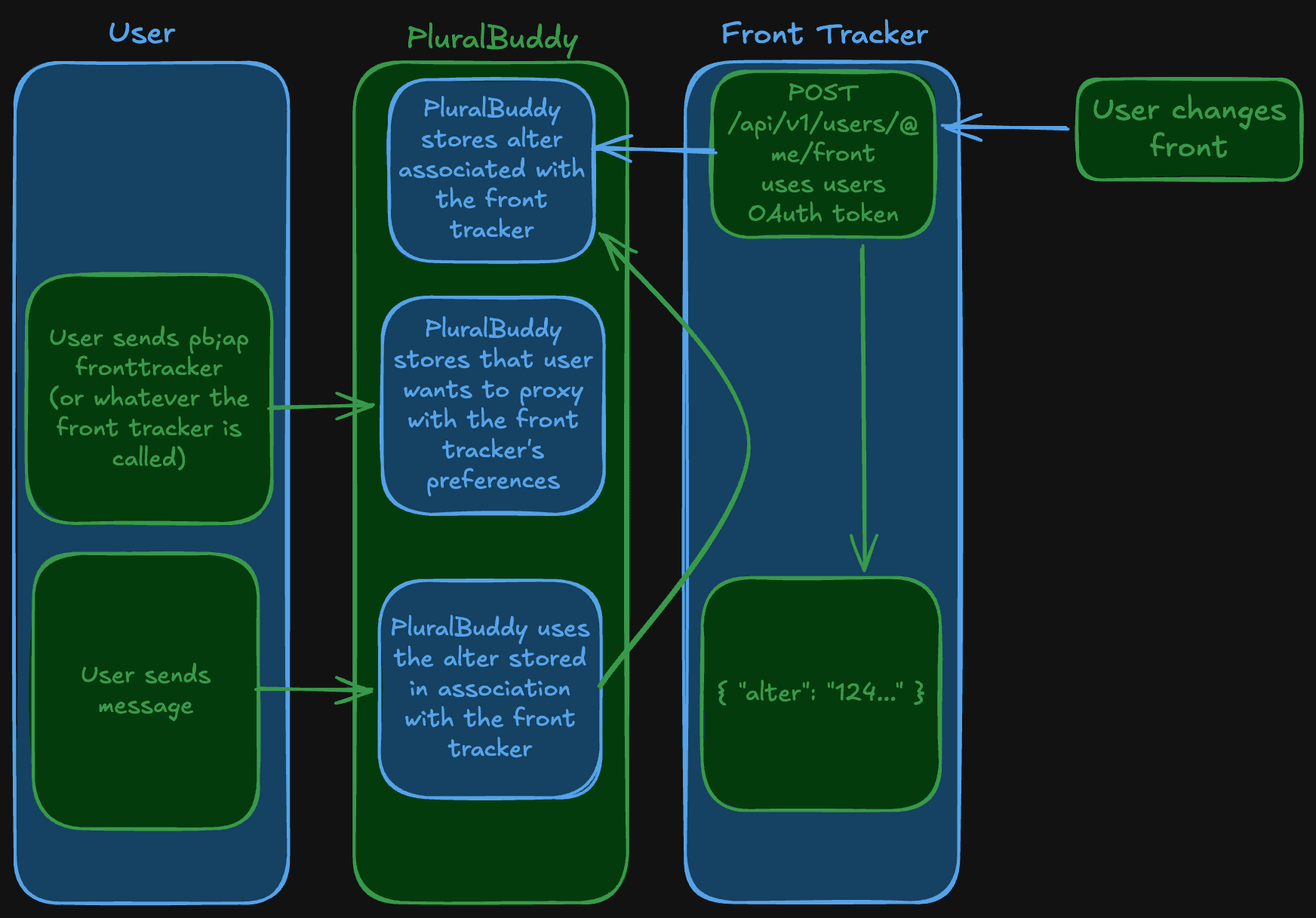
From a user perspective
A user first links the OAuth Application of your integration to their system. This integration, contains the system:ai-ap scope,
informing the user that this integration is a valid auto-proxy target. Then, if a user would like to auto-proxy as their alter stored in this integration, would be:
pb;ap fronttrackerwhere fronttracker is the AI/AP ID of the integration.
Then, all messages sent from that point on from that system, will always be the latest alter pushed from the integration.
Implementation Guide
0. Assign an AI/AP ID
In the Developer portal, you must select your application, and at the bottom type an identifier that matches your application. This can be your product name, or just a name that fits your front tracker.
Remember, this is the ID that your user will have to input to select the alter that your front tracker pushed to front. For example, if you AI/AP ID is pluralfront, then users would have to input pb;ap pluralfront to select the alter your chose.
1. Login via OAuth
Use the OAuth Application Guide to login a user with the OAuth scope atleast system:ai-ap.
You need a PluralBuddy alter ID to assign an alter to front. You may also need alters:read if you do not know the PluralBuddy alter IDs of the
associated alters in your store.
2. Push an alter
You can push an alter to front at any time. That alter will then immediately become the auto-proxy target for the user.
POST /api/v1/users/@me/front
Content-Type: application/json
Authorization: Bearer ...

{
    "alter": "1531049866753478700"
}
Tell the user then to use pb;ap <AI/AP ID>. Their fronting alter will sync over instantly.
How is this guide?