Context Menu Actions
PluralBuddy has certain actions you can do based on context of a message.
PluralBuddy has numerous context menu actions used to do certain actions from a message.
Actions
❌ Deletion Action
The deletion action, deletes the message that was sent by a webhook from an alter. You must be the owner of the original message before being able to delete a message.
As per PluralBuddy's Privacy Policy, this will also delete the database entry with the proxied message as well.
Deletion of a message is permanent. There is no way to reverse or otherwise undo a message deletion, as Discord doesn't allow that, either.
This doesn't require the Manage Messages permission due to the fact that webhooks can delete their own messages. However, this permission is otherwise required when proxying messages to delete the original message when proxying.
✏️ Edit Message
Context Menu Required
This action can only be used with the native Discord context menu. You cannot edit messages with reactions.
This will edit the message of a proxied message. Some links or special elements apart of the proxied message may need to be rerendered when editing messages. You must be the owner of the original message before being able to edit a message.
🔔 Nudge User
Users can be nudged, which will ping the author of the alter. Nudging can be disabled and specific users can be blocked from nudging you by using /nudge-preferences.
Nudging is the equivalent to "Ping Author" on other plural bots. Nudging is useful for getting the attention of users even when you don't know the main host of the system.
Nudging should not be used to get the attention of users that have blocked you on Discord. Doing such is against PluralBuddy's Terms of Service.
❓ Message Info
Message info will show information about the alters, systems, and various other message metrics. Good for figuring out the host of the system based on a proxied message.
This message will show in DMs if triggered via reaction, or ephemeral message if using the native context menu. If you use a context menu interaction and on mobile, there is a bug where you may not be able to see the response message if the original message is too far up in the channel.
Ways to trigger actions
PluralBuddy allows you to trigger context menu actions in two different ways.
Firstly, you can use the native Discord context menu actions that appear when right clicking a message and hitting Apps.
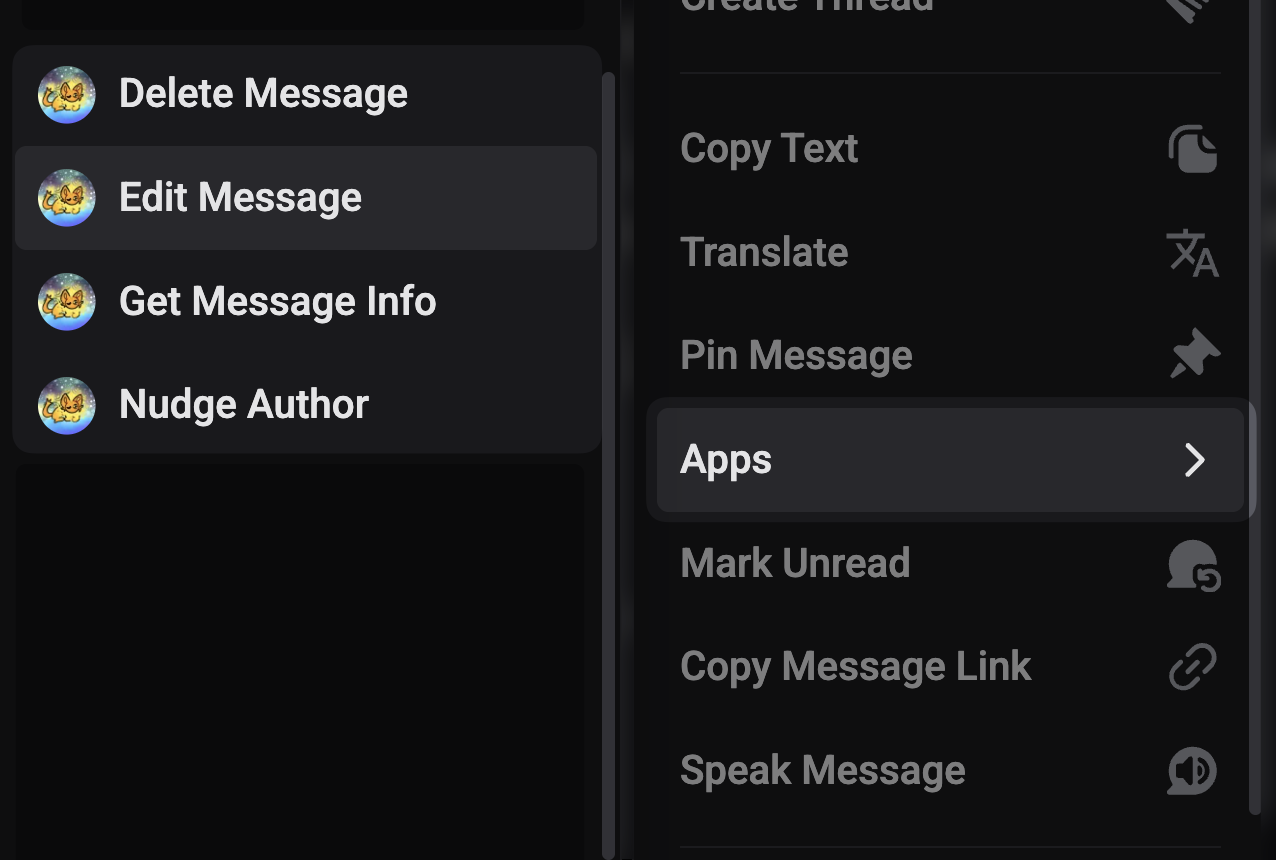
Additionally, you can also send a reaction to a message, which will achieve the action that you'd like to do.
- Delete Message: ❌
- Nudge User: 🔔
- Message Info: ❓
The reaction will be removed from the message once the action was completed. You will get feedback on the actions you complete based on additional reactions added by PluralBuddy.
How is this guide?